
Home › Forums › FABRIC General Questions and Discussion › Date format error when extending slice
- This topic has 11 replies, 5 voices, and was last updated 5 months ago by
Yaxue Guo.
-
AuthorPosts
-
December 4, 2025 at 3:11 am #9226
Hi,
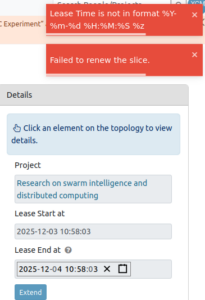
I’m facing an issue when trying to extend my slice, as I get a pop up error regarding the date format. It seems that it’s not in the right format %Y:%m:%d %h:%m:%s %z. Doesn’t work with neither the calendar not manual typing, and I tried two browsers. Makes me think maybe it’s a small bug?
thank you in advance!!
Best,
Xavi
December 4, 2025 at 11:45 am #9228Hi Xavier,
Thanks for flagging this! I’ll check into it and let you know once I have an update.
Best,
YaxueDecember 5, 2025 at 7:04 am #9236Hi Xavier,
Until we resolve this on the portal, you can also extend your slice via the JH, checkout this example on Jupyter Hub:
fabric_examples/fablib_api/renew_slice/renew_slice.ipynbBest,
Komal
December 5, 2025 at 8:53 am #9239That’s great thank you!!
December 5, 2025 at 9:54 am #9240Hi Xavier,
The problem was due to how the date was being formatted when extending a slice. We’ve just fixed it so it now matches what the system expects. You should be able to extend your slice without any errors now.Feel free to reach out again if anything else comes up!
Best,
Yaxue
December 5, 2025 at 10:22 am #9243Hi Yaxue,
I still get the same error but maybe it’s because the system didn’t get your changes yet? I will try again later.
Best,
Xavier
December 5, 2025 at 10:25 am #9244Either way with the API it worked as Komal suggested so I could extend my slice! 🙂
December 5, 2025 at 11:05 am #9245Hi Xavier,
Thank you for the feedback! The fix has already been deployed, so you should now be seeing the updated behavior.
From your earlier screenshot, I noticed that the “Lease End at” field was still showing the default time. The portal backend requires this value to include a timezone offset, but the default time displayed on the page does not include it. If the field isn’t modified, the old format is sent to the backend, which causes the request to be rejected.
As a quick test, could you please click the Lease End at field, adjust the time slightly (either using the picker or by typing), and then click Extend again?
Thanks again for your patience and for helping us track this down!
Best,
YaxueMay 17, 2026 at 7:40 am #9786Hello,
I have been experiencing with the same error: Lease Time is not in format %Y-%m-%d %H:%M:%S %z. Temporarily, Im using the option that Komal suggested: fabric_examples/fablib_api/renew_slice/renew_slice.ipynb
I just wanted to let you know that this issue still persists.
Let me know if you resolve it.
Thanks in advance,
Best,
Aggelos
May 18, 2026 at 1:51 pm #9787Hi Aggelos,
Thank you for reporting this.
We identified the root cause: the
Lease End atfield was being initialized using the raw API timestamp format, which was missing the required timezone offset formatting. This only caused problems when clicking Extend without first modifying the date picker, which matches the exact scenario you described.A fix has now been implemented and will be deployed shortly. After deployment, you should no longer need to manually adjust the time before clicking Extend.
In the meantime, the current workaround is to slightly modify the
Lease End atvalue using the date picker before submitting the extension.Thank you again for your patience and for helping us track this down.
Best,
YaxueMay 20, 2026 at 12:20 pm #9790I’m not certain if this is related, but this seems too much of a coincidence. When attempting to access any slice, I am getting this error: “Error Loading Slice Invalid date: Invalid Date” and I receive two options, try again and back to slices. I even created a new slice with the default dates, and after the creation I can see it listed with my other slices, but I get the same error attempting to access.
Thank you in advance.
regards,
Maureen
May 20, 2026 at 12:57 pm #9791Hi Maureen,
Thank you for reporting this! We’ve identified the cause — it’s a bug introduced in a recent update that affects
slice access when the lease end time hasn’t been fully assigned yet. A fix will be deployed today.Apologies for the inconvenience, and please let us know if the issue persists after today.
Best,
Yaxue
-
AuthorPosts


- You must be logged in to reply to this topic.