1. Date format error when extending slice

Date format error when extending slice

Home Forums FABRIC General Questions and Discussion Date format error when extending slice

Viewing 8 posts - 1 through 8 (of 8 total)
  • Author
    Posts
  • #9226
    XAVIER CASAS MORENO
    Participant

      Hi,

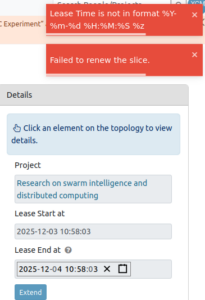
      I’m facing an issue when trying to extend my slice, as I get a pop up error regarding the date format. It seems that it’s not in the right format %Y:%m:%d %h:%m:%s %z. Doesn’t work with neither the calendar not manual typing, and I tried two browsers. Makes me think maybe it’s a small bug?

      thank you in advance!!

      Best,

      Xavi

      #9228
      Yaxue Guo
      Keymaster

        Hi Xavier,

        Thanks for flagging this! I’ll check into it and let you know once I have an update.

        Best,
        Yaxue

        #9236
        Komal Thareja
        Participant

          Hi Xavier,

          Until we resolve this on the portal, you can also extend your slice via the JH, checkout this example on Jupyter Hub: fabric_examples/fablib_api/renew_slice/renew_slice.ipynb

          Best,

          Komal

          #9239
          XAVIER CASAS MORENO
          Participant

            That’s great thank you!!

            #9240
            Yaxue Guo
            Keymaster

              Hi Xavier,


              The problem was due to how the date was being formatted when extending a slice. We’ve just fixed it so it now matches what the system expects. You should be able to extend your slice without any errors now.

              Feel free to reach out again if anything else comes up!

              Best,

              Yaxue

              #9243
              XAVIER CASAS MORENO
              Participant

                Hi Yaxue,

                I still get the same error but maybe it’s because the system didn’t get your changes yet? I will try again later.

                Best,

                Xavier

                #9244
                XAVIER CASAS MORENO
                Participant

                  Either way with the API it worked as Komal suggested so I could extend my slice! 🙂

                  #9245
                  Yaxue Guo
                  Keymaster

                    Hi Xavier,

                    Thank you for the feedback! The fix has already been deployed, so you should now be seeing the updated behavior.

                    From your earlier screenshot, I noticed that the “Lease End at” field was still showing the default time. The portal backend requires this value to include a timezone offset, but the default time displayed on the page does not include it. If the field isn’t modified, the old format is sent to the backend, which causes the request to be rejected.

                    As a quick test, could you please click the Lease End at field, adjust the time slightly (either using the picker or by typing), and then click Extend again?

                    Thanks again for your patience and for helping us track this down!

                    Best,
                    Yaxue

                  Viewing 8 posts - 1 through 8 (of 8 total)
                  • You must be logged in to reply to this topic.
