

Forum Replies Created
-
AuthorPosts
-
October 8, 2025 at 6:29 am in reply to: Unable to find SSH commands for slice that is being provisioned #9080
Hi Sourya,
Could you please delete your slice and try creating it again?
Best,
Komal
This was resolved offline.
Issue here was downloading
.ccode from JH container to desktop results intxtfiles.Recommended solution: Create a tar file of the entire directory and download the directory.
Best,
Komal
October 7, 2025 at 11:06 pm in reply to: Maintenance Network AM – 10/07/2025 – 8:00 pm – 9:00 pm #9078Maintenance is complete and network model has been updated!
Hi Nirmala,
I tried an example as below and it seems to be working:
1st parameter is the local path where file should be saved and second parameter being the remote location of the file to be downloaded.
node.download_file('hello.c','/home/rocky/hello.c')Could you please share which version of fablib are you using?
Best,
Komal
Hi Rasman,
I forgot to mention that the steps for installing iperf3 should be run as the root user. On your VM, I did the following:
sudo su -

curl -L https://github.com/esnet/iperf/releases/download/3.18/iperf-3.18.tar.gz > iperf-3.18.tar.gz
tar -zxvf iperf-3.18.tar.gz
cd iperf-3.18

sudo apt update
sudo apt install build-essential

sudo ./configure; make; make install
sudo ldconfig
I also applied the following host tuning (
node_tools/host_tune.sh) on both VMs:#!/bin/bash # Linux host tuning from https://fasterdata.es.net/host-tuning/linux/ cat >> /etc/sysctl.conf <<EOL # allow testing with buffers up to 128MB net.core.rmem_max = 536870912 net.core.wmem_max = 536870912 # increase Linux autotuning TCP buffer limit to 64MB net.ipv4.tcp_rmem = 4096 87380 536870912 net.ipv4.tcp_wmem = 4096 65536 536870912 # recommended default congestion control is htcp or bbr net.ipv4.tcp_congestion_control = bbr # recommended for hosts with jumbo frames enabled net.ipv4.tcp_mtu_probing = 1 # recommended to enable 'fair queueing' net.core.default_qdisc = fq #net.core.default_qdisc = fq_codel EOL sysctl --system # Turn on jumbo frames for dev inbasename -a /sys/class/net/*; do ip link set dev $dev mtu 9000 doneWith these changes, I’m now seeing bandwidth close to 10G (see snapshot below).
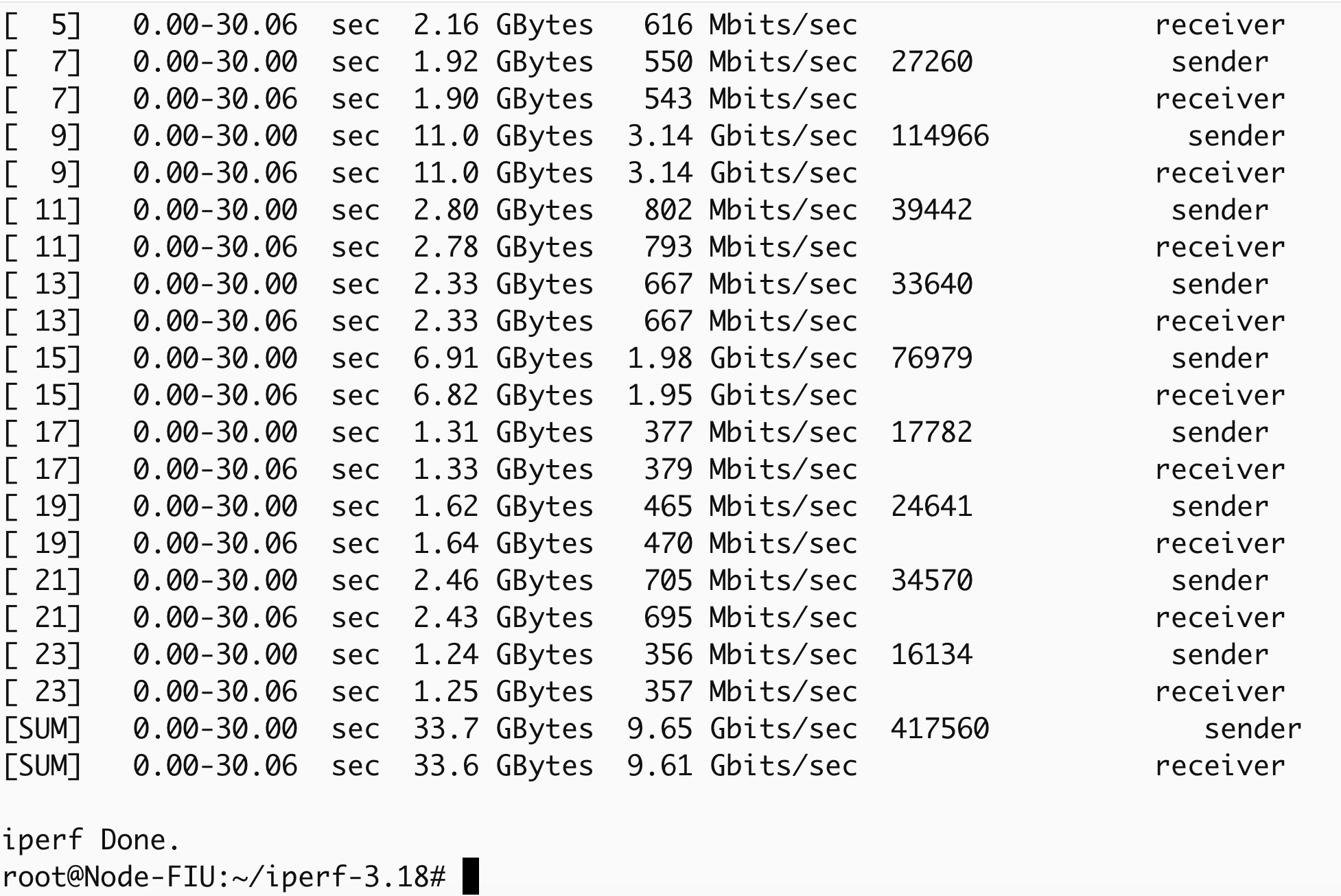
According to
fablib.list_links(), links from GATECH are capped at 8G. I’d suggest trying a different site instead of GATECH.
Regarding the slice getting stuck at Submit: your keys may have expired. Please try running the notebook
jupyter-examples-rel1.9.0/configure_and_validate/configure_an_validate.ipynb. This should automatically renew your keys if needed.If it still hangs at submit, please check
/tmp/fablib/fablib.logfor errors and share here.Best,
Komal
Hi Rasman,
By default, the standard iperf3 version does not perform well with multiple streams. ESnet provides a patched version that resolves this issue and delivers significantly better performance. This fixed iperf3 is already packaged inside the container.
If you would like to run it directly on the host, you can install it with the following steps:
curl -L https://github.com/esnet/iperf/releases/download/3.18/iperf-3.18.tar.gz > iperf-3.18.tar.gz
tar -zxvf iperf-3.18.tar.gz
cd iperf-3.18
sudo apt update
sudo apt install build-essential
sudo ./configure
make
sudo make install
Additionally, please make sure that the script
node_tools/host_tune.sh(included with the notebook) has been executed on the relevant nodes.If you continue to see lower bandwidth, kindly share your slice ID so I can take a closer look.
Thanks,
KomalSeptember 22, 2025 at 11:13 am in reply to: can’t see nvidia card though VM shows component assigned #9025Thank you for reporting this Maureen! We have identified the issue and working to identify a solution.
We will keep you posted about the resolution. Apologies for the inconvenience.
Best,
Komal
Hi Tanay,
We’re in the process of deploying them and are targeting DPU availability at KNIT11 around October 13–14.
Best.
Komal
Hi Nishanth,
Could you please try again? It should work now, freebsd fix introduced this check, i have disabled it now.
Best,
Komal
September 10, 2025 at 8:20 am in reply to: BSD images cause error- channel 0: open failed: connect failed: No route to host #8914Hi,
Fix for this issue has been deployed on production. Please try creating a slice and let us know if you run into any issues.
Best,
Komal
Hi Tejas,
You can use FABRIC’s Layer 3 FabNetv4 or FabNetv6 Network Service to establish connectivity between slices.
Any VM connected to FabNetv* in one slice can communicate with a VM connected to FabNetv* in another slice, provided the routes are configured correctly. You just need to add the following routes:
ip route add 10.128.0.0/10 via <fabnetv4_gateway>
ip -6 route add 2602:FCFB:00::/40 via <fabnetv6_gateway>
You may also find this example artifact helpful, as it demonstrates inter-slice connectivity using FabNetv4.
Best,
Komal
September 6, 2025 at 7:43 pm in reply to: BSD images cause error- channel 0: open failed: connect failed: No route to host #8898Thank you for sharing this, Nishant and YoursSunny.
I was able to reproduce the issue. On IPv4 sites, user SSH keys are not being injected, and on IPv6, SSH connections are failing completely. We’ll work on addressing this and will let you know once the fix has been deployed. Apologies for the inconvenience in the meantime.
Best,
Komal
Hi Dagim,
Thank you for sharing this observation. Could you update the instantiation of the
fablibobject in the first cell to the following and then try running the notebook again?fablib = fablib_manager(project_id=project_id, validate_config=False)Thanks,
KomalSeptember 3, 2025 at 11:06 pm in reply to: Running Jupyter notebook on JupyterLab doesn’t generate ssh_config file #8882Hi Zhihe,
This was a bug, a fix has been deployed on the default container. Could you please try running this notebook again?
Thanks,
Komal
Yes please Nirmala – Just keep the following in that file:
This should allow you to delete older examples.
{

"examples": [

{

"url": "default",

"location": "/home/fabric/work"

}

]

}
Best,
Komal
-
AuthorPosts
