
Home › Forums › FABRIC General Questions and Discussion › Cannot allocate GPU + ConnectX-6 on same node
Tagged: ConnectX-6, GPU, resource allocation, SmartNIC
- This topic has 7 replies, 3 voices, and was last updated 5 months, 3 weeks ago by
Komal Thareja.
-
AuthorPosts
-
April 23, 2026 at 5:47 pm #9714Hello FABRIC Support Team,I’m trying to create a node with both a GPU and ConnectX-6 SmartNIC on the same VM. I cannot get this combination to work on any site.What works:– GPU (Tesla T4) + ConnectX-5 on the same node: works– ConnectX-6 only node (no GPU): works– GPU only node (no ConnectX-6): worksWhat doesn’t work:– Any GPU + ConnectX-6 on the same node: fails on every siteI wrote a script that queries fablib API for sites with both GPU and ConnectX-6 available, I confirm the availability on the portal website, while script attempts to create a slice on each qualifying site. All sites fail with “Insufficient resources: No hosts available to provision.”Sites tested (all failed):BRIST: GPU_A30 + CX6UCSD: GPU_TeslaT4 + CX6FIU: GPU_TeslaT4 + CX6SRI: GPU_A30 + CX6UTAH: GPU_TeslaT4 + CX6GATECH: GPU_A30 + CX6TACC: GPU_TeslaT4 + CX6KANS: GPU_A30 + CX6RUTG: GPU_A30 + CX6PRIN: GPU_A30 + CX6GPN: GPU_TeslaT4 + CX6MAX: GPU_TeslaT4 + CX6MAX: GPU_RTX6000 + CX6Project: CREASEProject permissions: Slice.Multisite, VM.NoLimit, Component.Storage, Component.GPU, Component.GPU_A30, Component.GPU_RTX6000, Component.GPU_A40, Component.GPU_Tesla_T4, Component.SmartNIC_ConnectX_6, Component.SmartNIC_ConnectX_5Node specs requested: 8 cores, 16 GB RAM, 100 GB disk, default_ubuntu_22 (well within available resources at each site).Could you help me understand why GPU + ConnectX-6 allocation fails when both show as available? Is there a site where these two components are on the same physical host?Thanks,Bek
-
This topic was modified 5 months, 4 weeks ago by
Bekmukhamed Tursunbayev.
-
This topic was modified 5 months, 4 weeks ago by
April 23, 2026 at 6:14 pm #9718ConnectX-6 SmartNICs are located on the “FastNet Worker”
GPUs are located on “GPU Worker” and “SlowNet Worker”You can find information on this page -> https://learn.fabric-testbed.net/knowledge-base/fabric-site-hardware-configurations/
So, it will not possible to have both GPU and ConnectX-6 on the same VM.
However, CERN is an exception. It has 3x “FastNet Worker” servers. Each server has 2x ConnectX-6 SmartNIC and 1x A30 GPU on them.April 23, 2026 at 6:30 pm #9720Thank you for your response!
I tried CERN (A30 + CX6) but got “Component of type: A30 not available in graph node: 2B5F6R3”. The portal shows A30 available at CERN. Could the A30 and free CX6 be on different workers? Is there a way to target a specific worker that has both?
Also, CERN resources are almost always fully allocated. Is there a way to reserve or schedule resources in advance? Or is there a waitlist I can join?
April 23, 2026 at 9:40 pm #9722An easy way that works for me is checking the portal for the specific worker node’s resources. On the CERN, cern-w2 seems to be matching your needs. I will attach a screenshot from the portal but I’m not sure how it will show up on this comment, you can go to portal.fabric-testbed.net, click a link that leads to the CERN page (either from the map or from the table), then see the available resources. (if these are already known to you, then please disregard)
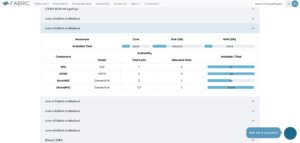
To target a specific worker node that has the desired resources, there may be some example functions within the example Jupyter notebooks that show filtering the worker nodes, and listing their resources. Or Fablib API documentation may reveal some ways, I don’t know much about that part. I guess knowledgable users from the community may share their methods.
For scheduling resources in advance, this resource may reveal some ways -> https://artifacts.fabric-testbed.net/artifacts/32938b00-5036-4a1e-84b5-063283618669
There may be some other ways to show the resource availabilities, but I will leave it to more advanced users or FABRIC team, they may have better pointers.
April 24, 2026 at 3:00 am #9723Thanks for the suggestion.
I checked cern-w2 on the portal and confirmed it has both A30 and ConnectX-6 available. I also verified through the fablib API:
cern-w2.fabric-testbed.net:
a30_available: 1
nic_connectx_6_available: 1I tried allocating with host=”cern-w2.fabric-testbed.net” and also without specifying host (letting FABRIC choose). Both fail:
With host specified: “Component of type: ConnectX-6 not available in graph node: 1B5F6R3”
Without host: “Component of type: A30 not available in graph node: 2B5F6R3”The graph node IDs in the errors (1B5F6R3, 2B5F6R3) change between attempts, which makes me think the allocation engine is not placing the VM on cern-w2 or its internal resource graph is out of sync with what the API reports.
I also tried lease_in_hours=6 with a 24-hour window, same result.
Has anyone seen this kind of mismatch between API availability and actual allocation? Any suggestions on how to work around this?
April 24, 2026 at 12:18 pm #9724We are checking on the status information for cern-w2 with respect to potential mismatch
due to a reservation that is currently consuming the resource but health of the reservation is not clear.
We will send updates.1 user thanked author for this post.
April 26, 2026 at 4:30 pm #9726Hi Bek,
Just a heads-up — the resource status on the portal isn’t quite matching the actual state of the resources right now. I’m working to get that sorted, but in the meantime you can use the fablib API to check availability and find an open slot for your target slice.
Here’s an artifact that should come in handy: https://artifacts.fabric-testbed.net/artifacts/e777ce3a-5b40-4e58-9666-7f31f655f03c
Best,
Komal
April 27, 2026 at 9:51 am #9727Portal view has been fixed too! Portal now shows the state of resources correctly.
Best,
Komal
-
This topic was modified 5 months, 4 weeks ago by
-
AuthorPosts


- You must be logged in to reply to this topic.